

Description
Rich Text Editor for Writers
Overview
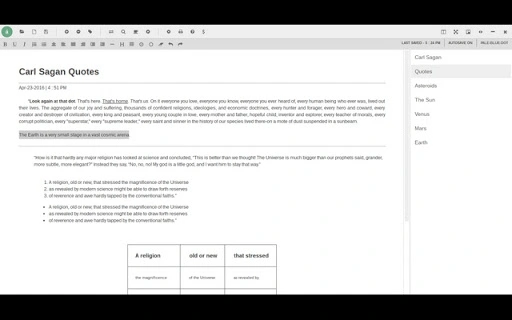
The Rich Text Editor (RTE) is a desktop application designed specifically for writers who need a lightweight, distraction-free environment to create and manage written content. Built by a writer for writers, it emphasizes simplicity, reliability, and full offline functionality. The software enables users to create projects with unlimited entries, all stored in a single file for easy backup and portability. This makes it ideal for long-form writing, research documentation, content creation, and personal note-taking. It was developed on a Chromebook and optimized for users working across multiple platforms, including Windows, Mac, and Linux. The developer, Edison Ilan, has focused on core functionality without unnecessary bloat, making it a practical tool for both casual and professional writers. The app’s ability to work entirely offline ensures privacy and uninterrupted workflow, especially in environments with limited connectivity. With features like autosave, search, and export options, it supports a complete writing lifecycle. The developer did not provide additional system requirements.
Key Features & Capabilities
- Offline Operation – Runs completely without internet access, ensuring data privacy and uninterrupted writing sessions.
- Single-File Project Storage – All entries are saved in one file, simplifying backups and file transfers across devices.
- Autosave Every Minute – Prevents data loss by automatically saving changes at regular intervals.
- Import/Export in Multiple Formats – Supports .txt, .html, and PDF exports for compatibility with other tools and cloud services.
- Rich Text Formatting – Offers standard formatting options including bold, italic, underline, headers, lists, alignment, and horizontal rules.
- CSV-Based Table Creation – Users can input data via comma-separated values to generate tables quickly.
- Distraction-Free Full-Screen Mode – Enables immersive writing by hiding all interface elements.
- Minify & Keep on Top – Allows users to minimize the window to a small floating panel that stays above other windows for referencing.
- Split-Screen Editing – Supports a dual-pane layout for comparing or editing multiple sections simultaneously.
- Customizable Appearance – Adjust font size, type, background color, and text color to match personal reading preferences.
- Text to Speech & Word Count – Includes tools for proofreading and tracking writing progress.
- Find & Replace – Streamlines editing by allowing quick navigation and modification of text across entries.
- Print to PDF – Offers a built-in print function to generate PDFs for cloud printing or sharing.
These features collectively support a seamless writing workflow, from drafting to final formatting. Writers can maintain focus while benefiting from robust tools for organization and output. The developer did not specify resource usage details.
User Interface, Workflow & Performance
The application presents a clean, minimal interface focused on text input and formatting. Navigation is straightforward, with toolbar options for common actions and keyboard shortcuts available for nearly all functions. The layout supports multiple modes, including full-screen and split-screen, allowing users to adapt the workspace to their current task. Workflow efficiency is enhanced by features like autosave, minify-on-top, and search functionality, which reduce interruptions and manual overhead. The user can switch between writing, referencing, and editing with minimal context switching. Performance observations are based on general software behavior patterns. The developer did not specify resource usage details. Stability is implied by the consistent update history and focus on core functionality. The application appears to maintain responsiveness during typical use, though exact CPU or RAM behavior was not provided.
Compatibility & System Requirements
Rich Text Editor is compatible with Windows, Mac, and Linux operating systems. The software version is 1.0, and the installation size is 15.3 MB. The developer did not specify exact system requirements. Compatibility information was partially provided. The application is designed to run on desktop environments without relying on web services, making it accessible across a wide range of hardware configurations. It does not require an internet connection to operate, which enhances accessibility in low-connectivity environments.
Pros and Cons
Pros
- Runs entirely offline – ideal for privacy and uninterrupted writing
- Single-file project storage – simplifies backup and portability
- Autosave every minute – reduces risk of data loss
- Supports multiple export formats including PDF, HTML, and TXT
- Highly customizable interface with font and color options
- Distraction-free and split-screen modes for focused work
- Free to use with full ownership rights available for purchase
- Lightweight at 15.3 MB, suitable for older or low-resource machines
Cons
- Developer did not provide detailed system requirements
- Performance metrics such as CPU or RAM usage were not disclosed
- Only one version (1.0) is available; no indication of future updates
- Limited to text-based content; no support for multimedia or embedded files
- No built-in collaboration or version history features
FAQ Section
Is this software free to use?
Yes, the Rich Text Editor is available for free. The developer offers it at no cost, with the option to purchase source code and full ownership rights.
Can I use this on Windows, Mac, and Linux?
Yes, the software is compatible with Windows, Mac, and Linux operating systems as stated in the product details.
Is the software secure and private?
Yes, the application runs entirely offline and does not transmit data to external servers, ensuring user privacy and data security.
How often are updates released?
The last update was released on April 23, 2016. No information is available about future update schedules.
Can I export my work to PDF or HTML?
Yes, the software supports exporting projects or individual entries to PDF, HTML, and TXT formats for sharing or publishing.
Final Thoughts
The Rich Text Editor stands out as a focused, reliable tool for writers seeking a lightweight, offline-first writing environment. Its single-file project system, autosave functionality, and distraction-free modes make it a strong choice for individuals who value simplicity and data control. The ability to export to multiple formats and customize the interface adds practical value. While the lack of updated features or future development signals may concern some users, its current functionality remains solid and effective. For writers working on Chromebooks or across multiple desktop platforms, this software offers a dependable solution. The fact that it is free and potentially available for full ownership makes it even more appealing. Download Rich Text Editor now.
Guides & Tutorials for ain't App for Chrome
How to install ain't App for Chrome
- Click the Preview / Download button above.
- Once redirected, accept the terms and click Install.
- Wait for the ain't App for Chrome download to finish on your device.
How to use ain't App for Chrome
This software is primarily used for its core features described above. Open the app after installation to explore its capabilities.
User Reviews for ain't App for Chrome 0
No reviews found





